
AT&T Secure Family® parent app
AT&T Services, Inc.Lifestyle
4.59.86K Reviews
- Version
- 12.1.2
- Installs
- 10.00M
- Age Rating
- Everyone
Screenshots


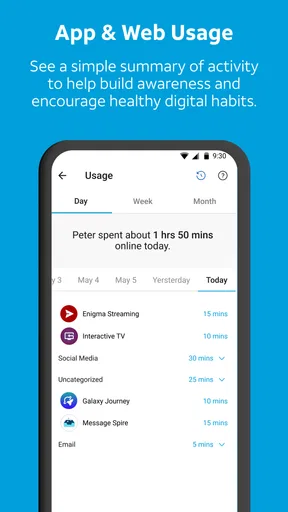
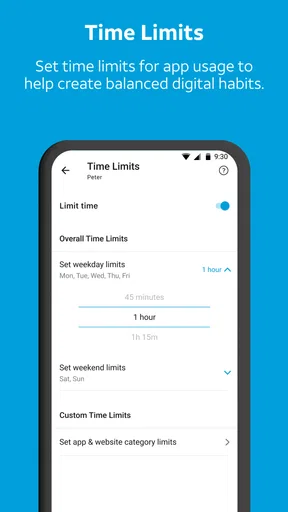
Our Review of AT&T Secure Family® parent app
 Analysis by Appyee
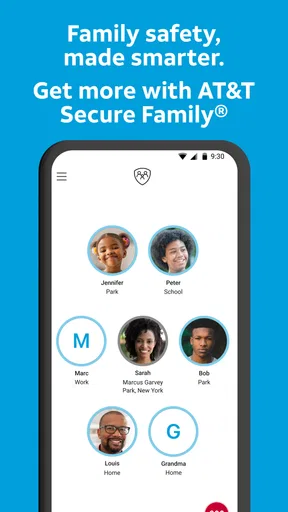
I came away from AT&T Secure Family® seeing it as a practical family-management tool rather than a flashy tracking app. It combines location sharing with parental controls, so I can check where family members are, manage screen time, and block apps from one place. That combination is useful because the real challenge at home is rarely just knowing where a child is; it is also setting reasonable boundaries around phones.
The app sits in the lifestyle category and is developed by AT&T Services, Inc. It is free to install, rated for Everyone, and has reached more than ten million installs. Its current version is 12.1.2, while the app itself has been available since April 26, 2010. Those details suggest a product that has had time to mature, although the experience still depends heavily on how carefully a family configures it.
How the current app feels in everyday family life
My first impression is that the app works best when everyone understands the arrangement before tracking begins. A parent can use it as a central place for family location tracking and phone rules, but it should not be introduced as a secret surveillance tool. The practical benefit comes from shared expectations: children know when location is being checked, which apps are restricted, and what screen-time limits mean.
A realistic example would be a teenager traveling home after school. I could use the location feature to see whether the phone is moving toward home, then rely on the parental controls to reduce distracting app use during homework hours. That is more useful than opening a separate map app for location and then searching through unrelated phone settings for restrictions. The value is in the workflow, not in any single feature.
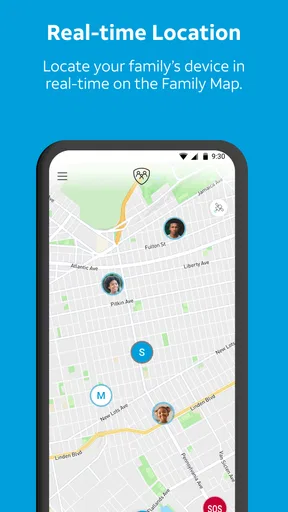
The location side is particularly helpful for families with changing routines. If a child goes from school to sports practice and then to a friend’s house, a parent can use the family view as a quick check-in point instead of sending repeated messages. I would still treat it as a convenience rather than a guarantee of safety. Phones can be left behind, lose connectivity, run out of battery, or show information that needs context.
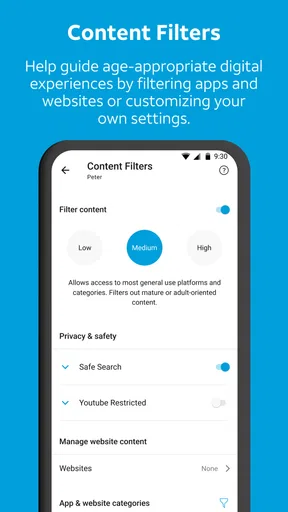
The parental-control side addresses a different problem. Screen-time limits and app blocking are useful when a child keeps switching from homework to entertainment, or when a younger child needs a simpler selection of permitted apps. I like that these controls are presented alongside location tools because parents often need both kinds of oversight during the same part of the day.
That said, the app is not a substitute for a family agreement. A technical limit can start an argument if nobody has discussed why it exists. I found the strongest approach was to use the controls as a reminder of an agreed routine, not as the entire parenting strategy. The app can enforce a boundary, but it cannot explain it or adapt to a child’s mood, schoolwork, or unusual circumstances.
What has changed over the product’s life
Because this app has been available since 2010, it has evolved from the era when families often managed location sharing and phone restrictions through separate tools. The current release, 12.1.2, reflects an established product rather than a brand-new experiment. I would describe its evolution as a move toward a broader family dashboard: location, screen time, and app access are treated as connected parts of daily device management.
The important point is not simply that the version number is recent. It is that existing users are likely approaching the app with habits formed over several years, while new users may expect a polished setup from the first launch. A long-running app has to serve both groups. In my experience, that makes consistency especially important: families want controls they can understand quickly and routines that do not need constant rebuilding.
The app’s store presence also shows substantial adoption, with an average rating of 4.5 from around forty thousand ratings and roughly 9.9 thousand written reviews. I read that as evidence of broad interest and generally positive reception, not as proof that every household will have the same experience. Family-control apps are unusually sensitive to phone models, account arrangements, connectivity, and the age of the people using them.
One useful way to think about the current release is that it is designed for ongoing management rather than a one-time safety check. I would not install it only for a holiday trip and expect it to solve every concern immediately. Its real strength appears after the family has settled into recurring patterns: school days, evenings, weekends, and exceptions such as travel or special events.
What existing users should notice after updating
If I were already using the app, I would begin by reviewing the existing family setup instead of assuming that an update leaves every rule perfectly suited to current routines. Children grow, phones change, and a restriction that made sense last year may now be too strict or too loose. A version update is a good moment to check whether the selected limits still match the household’s needs.
I would also test the controls at a calm time, not five minutes before school or bedtime. Try the location view, review the screen-time arrangement, and confirm that app-blocking decisions reflect what the child actually uses. This is one of the less obvious lessons with a family-control app: the quality of the result depends as much on maintenance as on installation.
Another practical habit is to create a clear exception routine. If homework needs an educational app that is normally blocked, the parent should know how to handle that before the child is waiting for access. Likewise, if a child is traveling somewhere unfamiliar, location checking should be paired with a simple message or agreed check-in. The app is more reliable as part of a planned process than as an emergency button.
Existing users should also pay attention to how the family feels about the controls. A parent may see fewer distractions, while a child may experience the same setting as unpredictable if the limits change without explanation. I found that giving a short reason for a restriction makes the technology easier to accept. This is not a software feature, but it has a direct effect on whether the app remains useful over time.
The free price makes it easy to try without committing money at the start. However, in-app purchases are listed at $7.99 per item, so I would review any purchase prompt carefully before treating the app as permanently cost-free. That is especially important in a household where several people may use the same device or account. The installation decision and the longer-term cost decision should be treated separately.
Where the app is strongest compared with usual alternatives
The usual alternative is to combine a map-based location service with the phone’s built-in digital-wellbeing or parental-control settings. That approach can work, and it may be preferable for families who want the fewest possible apps. The drawback is fragmentation. Location may live in one place, screen limits in another, and app blocking somewhere else. AT&T Secure Family brings those concerns into one family-focused experience.
That single-home view is its clearest advantage. I do not have to remember which tool handles location and which one handles device rules. For a parent managing more than one child, reducing the number of places to check can make the routine less tiring. The app is also a better fit than a location-only tool when the main concern is balancing independence with phone habits.
On the other hand, a dedicated map service may feel simpler for relatives who only want location sharing and do not need screen-time controls. Built-in phone settings may also be preferable for someone who wants to avoid adding another family-management layer. I would choose this app when the combined workflow matters; I would skip it when location is the only requirement or when every family member prefers managing settings directly on the device.
There is also a trust trade-off. Centralized controls are convenient, but they make the parent’s role more powerful. If the family wants a lightweight check-in system based mostly on voluntary sharing, this app may feel too involved. Conversely, for younger children or households that need firm routines, having location and restrictions together can be exactly the point.
Small workflows that make a noticeable difference
My first recommendation is to start with one specific routine instead of activating every control immediately. For example, begin with an evening screen-time boundary, observe how it fits the household, and then add app blocking where it solves a real problem. This makes it easier to identify whether a difficulty comes from the rule itself or from the way the family is using the app.
Second, use location as a conversation aid rather than constantly refreshing it. A quick check can replace unnecessary messages, but repeated checking can become stressful for both sides. I would set an expectation about when location is normally used and reserve extra checking for travel, late arrivals, or a changed plan.
Third, review blocked apps by purpose, not just by popularity. Blocking everything entertaining may also remove tools a child uses to communicate, study, or organize activities. A more thoughtful setup separates distraction from genuinely useful access. This is where the parent’s judgment matters more than the app’s controls.
Fourth, keep a manual backup for important plans. If a child is expected at a particular place, I would still make sure they know the address, meeting point, and contact method. Location technology can support that plan, but it should not be the only source of information. This is a particularly important trade-off for families who might otherwise assume that a map view removes the need for communication.
Finally, revisit the arrangement after a few weeks. A rule that works during school nights may be inappropriate on weekends, and a younger child’s needs can change quickly. The app becomes much more valuable when its settings evolve with the family instead of becoming a fixed collection of restrictions.
Remaining gaps and situations where I would skip it
The biggest limitation is that the app cannot remove the human work involved in family device management. Parents still need to decide what is reasonable, explain changes, and handle exceptions. If someone expects an automatic system that understands every family situation, this will feel limiting.
I would also be cautious about choosing it for a household that does not want a dedicated parental-control app. Some families may be satisfied with the phone’s existing settings, especially if they only need occasional screen-time reminders. Adding another system can create confusion when rules overlap or when different adults use different methods.
It is not the right choice for someone seeking only a basic location-sharing experience. The extra controls are the reason to consider it, but they are also unnecessary complexity if all a family wants is a shared map. Likewise, older children who already manage their own screen habits may resist a system that feels more restrictive than helpful.
Compatibility deserves attention before installation. The minimum operating-system requirement is iOS 9, which makes the app accessible to a broad range of devices, but families should still make sure every phone involved can run the intended setup. The app’s usefulness depends on the whole family arrangement, not merely on whether one parent’s phone can install it.
Privacy and trust are also personal decision points. I would only use the tracking features with clear family knowledge and a sensible reason. The app can make safety planning easier, but constant monitoring may damage trust if it is used without limits. For me, that is the line between responsible family support and overreach.
What I would watch before making it part of the routine
I would watch how smoothly the current version fits into real transitions: leaving school, starting homework, going to bed, and changing plans. Those moments reveal more than a quick installation test. A family-control app succeeds when it reduces repeated arguments and unnecessary checking, not merely when its features appear on screen.
I would also watch the balance between convenience and paid extras. The app is free to install, but the presence of $7.99 in-app items means I would examine the available choices before recommending it for a long-term household setup. A free starting point is useful, yet families should know what they are agreeing to if they later want more.
For existing users, I would watch whether the latest version preserves familiar routines while making the combined dashboard easier to manage. For new users, I would watch the onboarding experience and the clarity of the first configuration. Those are the moments that determine whether parents feel in control or simply face another set of settings.
My overall view is positive, with an important qualification: the app works best when technology supports a clear family agreement. The combination of location tracking, screen-time limits, and app blocking is more useful than any one of those tools alone for families that want centralized oversight. Its 4.5 average and large user base make it a credible option to consider, but they should not replace a household-specific decision.
I would recommend it to parents who want one place to manage location and phone boundaries, especially when daily routines involve school, commuting, homework, and changing plans. I would point someone toward simpler built-in controls or a location-only alternative if they want minimal setup or have no interest in app restrictions. For the right family, AT&T Secure Family® can turn scattered phone rules into a more manageable routine; for the wrong one, it may simply add another layer to maintain.
Verdict
Strengths of AT&T Secure Family® parent app
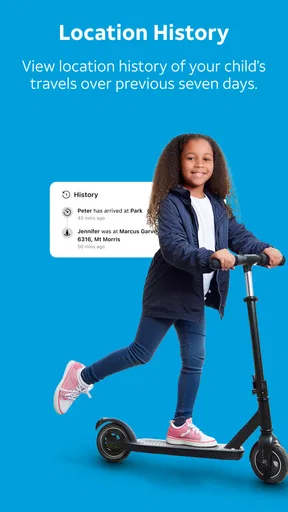
- Locate family members with real-time GPS tracking and location history.
- Set screen-time limits and schedules for healthier device habits.
- Create safe zones and receive alerts when family members arrive or leave.
- Pause a child’s device remotely during homework, meals, or bedtime.
- Manage multiple family members from one centralized dashboard.
Limitations of AT&T Secure Family® parent app
- Some features require an eligible AT&T wireless plan or subscription.
- Location accuracy can vary indoors or in areas with weak cellular coverage.
- Children may need the companion app installed and configured correctly.
- Battery usage may increase when continuous location tracking is enabled.
- Advanced controls can feel intrusive for older children and teenagers.
Other Releases by AT&T Services, Inc.
View All
AT&T
Productivity4.5

AT&T ActiveArmor®
Tools4.2

AT&T Visual Voicemail
Communication3.1

Smart Home Manager
Productivity4.4
Similar Picks in This Category
View All
SmartThings
Samsung Electronics Co., Ltd.4.6

Google Home
Google LLC4.0

Pinterest4.2

Astrotalk - Talk to Astrologer
Astrology & Horoscope4.7

My Verizon
Verizon Consumer Group4.5

Samsung Wallet (Samsung Pay)
Samsung Electronics Co., Ltd.4.1
Frequently Asked Questions
What is the AT&T Secure Family® parent app used for?
AT&T Secure Family® is designed to help parents manage and supervise a child’s smartphone use. From the parent app, you can view a child’s device location, set screen-time schedules, pause internet access, manage content filters, and review certain activity controls. It is intended as a family safety and digital-wellbeing tool rather than a replacement for open communication with your child.
Does AT&T Secure Family® work with every phone and mobile carrier?
Compatibility depends on the devices, operating systems, and wireless service involved. The service is primarily built for AT&T customers and may require an eligible AT&T wireless account or plan. Parents should check the current requirements in the Google Play Store, App Store, or AT&T’s official support pages before downloading. Some features may also vary between Android and iPhone devices.
Can parents track a child’s location with AT&T Secure Family®?
The app can provide family location features when location services, account permissions, and the child companion setup are correctly enabled. Location accuracy may change depending on GPS availability, indoor conditions, battery level, network coverage, and the phone’s privacy settings. Parents should explain location sharing to children and review permissions regularly, since disabling required access can limit or stop tracking.
Can AT&T Secure Family® block apps, websites, or internet access?
AT&T Secure Family® offers parental controls that may help manage internet access, apply content restrictions, establish bedtime or study schedules, and pause connectivity on a child’s device. However, filtering is not guaranteed to identify every inappropriate website or online interaction. Controls can also be affected by device settings, software updates, VPNs, Wi-Fi connections, or unsupported services, so parents should combine the app with supervision.
Is AT&T Secure Family® free to download, and are there extra charges?
The app may be free to download, but access to its complete features can depend on an eligible AT&T plan, subscription, promotional offer, or account configuration. Pricing and included tools may change over time, and some families could see charges through their AT&T bill or an associated subscription. Before activating the service, review the current terms, trial conditions, renewal details, and cancellation policy.
